Accuracy is not just a buzzword in steel structure projects—it shapes everything, from budget to safety and schedule. We've seen small design errors snowball into costly delays, workshop headaches, and unhappy clients. So, how does Tekla change the game for complex projects?
Tekla improves accuracy by connecting design and fabrication into a seamless workflow. Its buildable models, detailed connections, clash checks, and automated documentation reduce errors and drive real-world results for industrial steel projects.
Our experience tells us: you don’t want surprises on site. That’s why we put Tekla at the center of large, demanding projects. Let us show you what makes it so powerful.
How Does Tekla Create Buildable, Detailed Models Instead of Just Pretty 3D Drawings?
It’s tempting to trust a flashy 3D model. We’ve all done it. Yet, when the workshop starts fabricating, those “visual” models sometimes fail the reality test. Tekla offers something different.
Tekla builds models with nuts and bolts, true plate shapes, welds, cutbacks, material markings, and surface treatments. We don’t guess how something will be built—we model it as it’ll be fabricated.
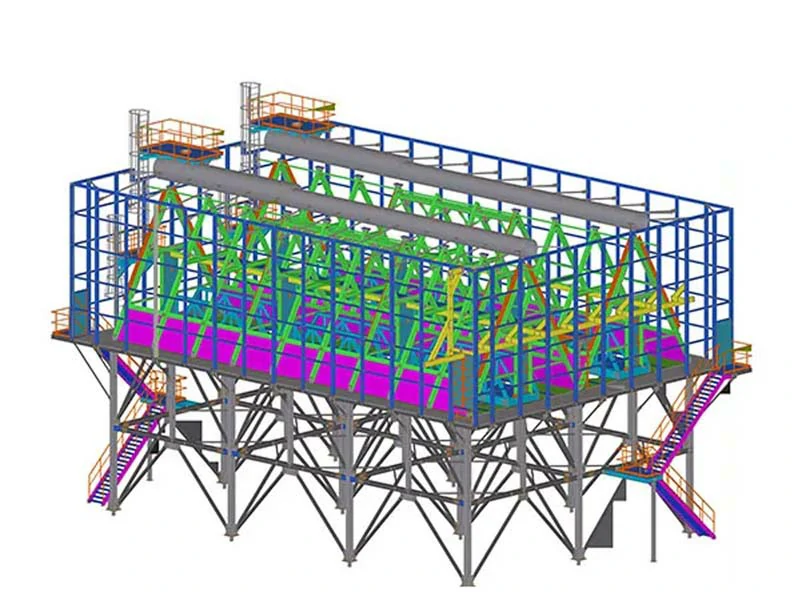
When our design team uses Tekla, we add every practical detail: notches, cope holes, bolt patterns, assembly marks. Every component in our model has the same logic as the workshop. This closes the gap between "nice design" and "real fabrication."
Here's a practical table showing the difference:
| Element | Visual Model | Tekla Model |
|---|---|---|
| Beams/Columns | Generic | Exact profiles & sizes |
| Plates | Flat shapes | True geometry/holes |
| Connections | Basic plugs | Real welds, bolts |
| Part/Assembly Marks | Not shown | Fully specified |
| Materials | Sometimes | Full specs, surfaces |
| Fabrication Features | Missing | Included (chamfers) |
The truth is, when our models reflect workshop logic, we save hours of questions, avoid site improvisation, and get more predictable results. This is knowledge we've gained through many projects—and Tekla helps us apply it every time.
Why Is Tekla’s Connection Modeling So Essential?
We know from experience: connections are where projects get tricky. Most costly mistakes happen at the joints—not on the main beams and columns. Tekla lets us model connections with extreme precision and foresight.
We include end plates, base plates, stiffeners, gusset plates, splice details, anchor bolts, and bracing—all checked before fabrication begins.
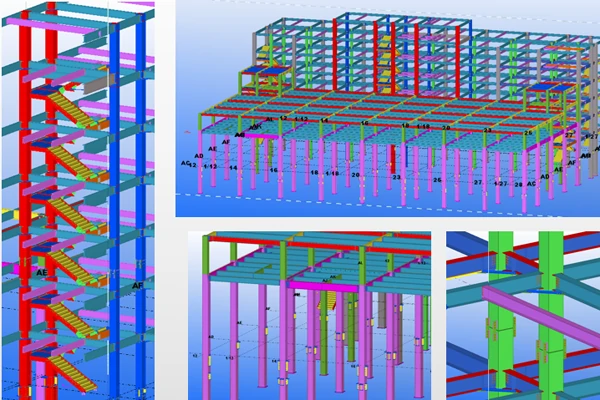
When we use Tekla, the software highlights mismatches in bolt layouts, missing stiffeners, awkward welds, and assembly logic before we cut any steel. This means fewer errors in the shop and on site, which helps keep schedules on track.
Here's how connection accuracy plays out in real life:
| Common Connection Error | Without Tekla | With Tekla |
|---|---|---|
| Plate misalignment | Frequent | Rare |
| Hole spacing mistakes | Often | Easy to catch |
| Missing brackets | Sometimes | Highlighted instantly |
| Difficult welds | Discovered late | Checked in model |
| Assembly fit-up issues | At installation | In pre-check |
It’s the tough lessons from hundreds of site installations that teach us the value of modeling connections carefully. Tekla takes that experience and helps us turn it into a consistent advantage.
How Does Tekla’s Clash Detection Help Us Avoid On-Site “Emergencies”?
Steel never exists alone in industrial projects. It’s always competing for space with pipes, cable trays, ducts, equipment, platforms, and supports. We've seen too many jobs stall because of unexpected clashes.
Tekla’s clash detection tools spotlight conflicts between steel and other trades from day one. We resolve these digitally first, so the field crew doesn’t have to improvise.
Catching clashes early means avoiding the worst on-site fixes: torch modifications, unauthorized drill holes, hot-work risks, paint damage, and “rush jobs” that cost more than planned.
Here's what we typically face:
| Clash Scenario | Traditional Fix | Tekla Approach |
|---|---|---|
| Pipe penetrates beam | Field fix | Resolved in 3D |
| Cable tray crosses column | Cut after install | Adjust in model |
| Ladder hits handrail | Redesign on site | Catch in advance |
| Equipment/foundation clash | Delay and rework | Plan with Tekla |
By using Tekla, we steer clear of last-minute chaos, saving everyone time and protecting the project’s momentum.
How Does Automatic Drawing Generation Minimize Errors in the Shop?
Manual drawing updates are a major source of confusion. We’ve faced situations where a minor detail change wasn’t reflected in assembly drawings, resulting in missed parts and costly delays.
Tekla’s automatic drawing generation ensures every drawing, BOM, bolt list, and CNC file stays tied to the central model. We update the model, and all documents update too.
Our team relies on this accuracy. It means the shop team gets clear, consistent instructions and doesn’t spend time deciphering outdated or contradicting details.
Here's a practical breakdown:
| Drawing Problem | Manual Detailing | Tekla Automated |
|---|---|---|
| Outdated part numbers | High risk | Always current |
| Missed revisions | Frequent | Synced with model |
| BOM/model mismatch | Common | Accurate every time |
| CNC file errors | Sometimes | Linked direct |
We’ve learned that shops work faster and smarter when drawings, BOMs, and CNC files all align. Tekla’s automation delivers that every time.
How Does Tekla’s Material Take-Off Accuracy Help Us Control Costs?
Anyone who’s managed big steel projects knows: inaccurate material take-offs spell trouble. Ordering too much or too little steel leads to wasted money, delays, and stress.
Tekla generates precise material quantities—steel shapes, plates, bolts, welds, surface areas—directly from the buildable model.
With Tekla, we eliminate surprises. Automated take-offs mean we avoid overruns, minimize waste, and plan procurement with confidence.
Here’s how Tekla's material accuracy stacks up:
| Material Issue | Without Tekla | With Tekla |
|---|---|---|
| Scrap/remakes | Too common | Minimized |
| Procurement delays | Frequent | More predictable |
| Over/under-ordering | Often missed | Caught early |
| Budget overruns | Endemic | Lower risk |
Better take-offs have helped us run smoother jobs, especially with frequent design revisions and massive steel scopes.
How Do Tekla’s Revision Controls Keep Us on Track in Fast-Changing Projects?
Projects often change rapidly. We’ve seen chaos erupt when old drawings circulate, crews fabricate from outdated designs, and installation teams receive conflicting instructions.
Tekla manages revisions by anchoring everything around the latest model. When a client changes the equipment layout or pipes, we regenerate drawings and BOMs directly from the new model.
This approach cuts confusion and keeps the whole project team rowing in the same direction.
The value becomes clear here:
| Revision Issue | Traditional Chaos | Tekla Control |
|---|---|---|
| Outdated drawings | High risk | Updates synced |
| Fabrication errors | Frequent | Drastically reduced |
| Change-order delays | Rampant | Managed clearly |
| Team confidence | Often shaken | Much higher |
We’ve learned over the years: controlled change protects schedules, budgets, and team morale. Tekla gives us the tools to do it right.
How Does Tekla Integrate with CNC Fabrication for Precise Production?
Even beautifully detailed drawings can lead to mistakes if workshop staff must manually enter numbers into fabrication machines. Typing errors, missed dimensions, and interpretation problems all cause trouble.
Tekla integrates directly with CNC cutting, drilling, sawing, and marking machines. The digital files we export from the model match what gets built.
This eliminates so much risk. When we shorten the chain from design to production, we see fewer errors and more predictable results.
Comparison:
| Production Error | Manual Workflow | Tekla CNC Integration |
|---|---|---|
| Typing mistakes | Too common | Virtually eliminated |
| Missed dimensions | Sometimes | Always complete |
| Setup inconsistency | Frequent | Standardized |
| Production error rate | High | Lower |
It’s clear: every manual step adds risk. Tekla lets our team focus on quality, not damage control.
How Does Tekla Help Organize Erection Sequencing and Assembly?
Fabricating steel is just half the battle; getting it up on site, in the right order, is equally crucial. Fit-up failures and missing parts often come down to poor logistics.
Tekla models assemblies, lot shipments, erection phases, and installation zones so we can plan ahead.
When our field crews have access to Tekla’s logical sequencing, they avoid mixing mirrored parts, losing small items, or installing out of line.
Real experience has taught us:
| Erection Issue | Traditional | Tekla Sequenced |
|---|---|---|
| Wrong part installation | Often | Rare |
| Missing assemblies | Common | Controlled |
| Shipping confusion | Every project | Minimized |
| Site delays | Predictable | Strongly reduced |
Tekla’s logic makes the real difference between running a smooth site and having the team scrambling for fixes.
How Does Tekla Improve Coordination Across Teams and Stakeholders?
Accuracy means nothing if designers, fabricators, field installers, inspectors, and project managers aren’t working together. Miscommunication kills progress.
Tekla provides a shared model where all stakeholders can check dimensions, connections, materials, and installation logic together.
With Tekla, we hold joint reviews, settle disputes early, and clarify specs before problems impact the budget.
This table shows the improved teamwork:
| Coordination Issue | Without Tekla | With Tekla |
|---|---|---|
| Interpretation gaps | Constant | Sharply reduced |
| Miscommunication | Frequent | Smoother |
| Multi-party confusion | Costly | Much improved |
| Project risk | High | Lowered |
Better collaboration is a real, lived gain for all industrial projects.
How Does Tekla Improve Quality Control and Client Confidence?
For QA/QC, we need traceability—dimensions, materials, weld specs, bolt grades—all must match. Clients and inspectors want proof, not guesswork.
Tekla gives us a model-based source for verification. We check production against the digital details, not vague 2D sketches.
We present clients with clear records. This not only wins approval faster but also assures clients that we’re managing risk, not just processing steel.
Comparison:
| QA/QC Issue | 2D Workflow | Tekla Model-Based |
|---|---|---|
| Dimension checks | Difficult | Direct and clear |
| Revision verification | Messy | Always current |
| Material traceability | Uncertain | Transparent |
| Approval cycle | Lengthy | Faster, smoother |
Tekla helps us deliver not just steel, but peace of mind.
Conclusion
Tekla turns steel structure projects from risky bets into predictable, precise workflows. By connecting modeling, fabrication, coordination, and installation, it protects your budget, schedule, team effort, and client confidence. This is more than theory—it’s experience we’ve gained and put to work, project after project.